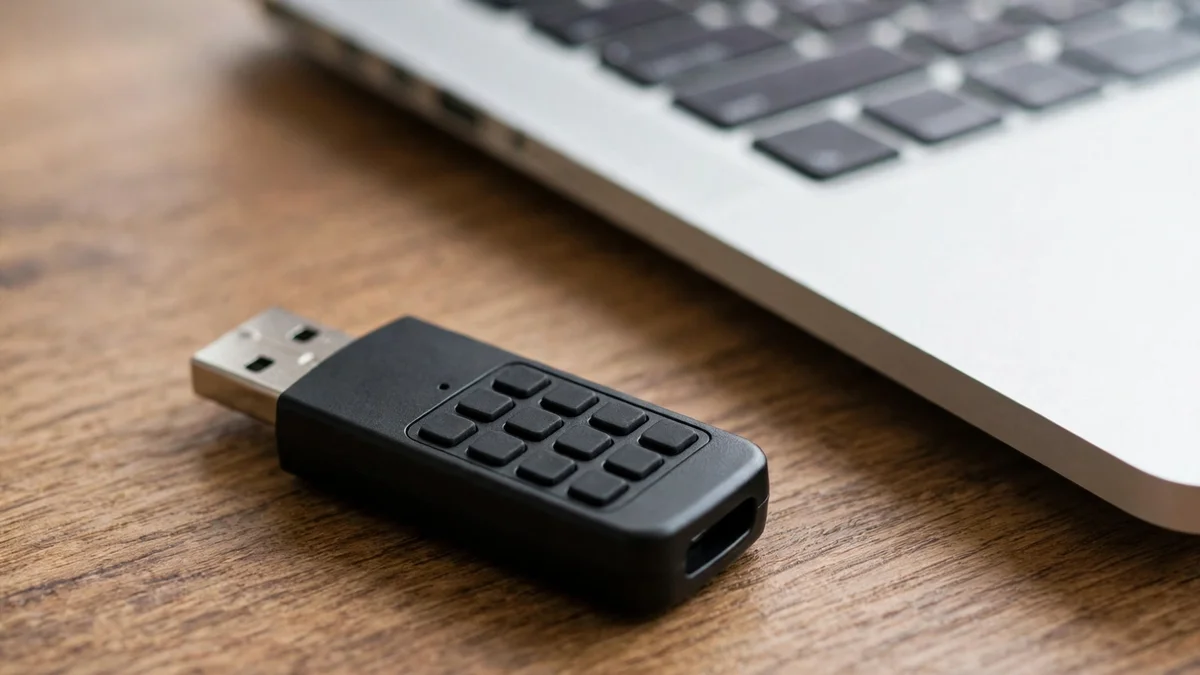

iStorage is a company that makes hardware-encrypted storage devices, best known for its datAshur range of USB flash drives that unlock with a PIN typed on a small keypad built into the drive itself. The central question is simple: what makes an iStorage drive different from an ordinary USB stick? The answer is that the encryption happens inside the drive, in hardware, so files are scrambled before they are stored and no software or password on the computer is needed to protect them.
That difference matters most when a drive is lost or stolen. An ordinary USB stick gives anyone who finds it full access to its contents, while an iStorage drive stays locked until the right PIN is entered, and it can destroy its own encryption key after repeated wrong guesses. This guide explains what iStorage makes, how its drives work, and who they are really for, without any sales talk.
Key takeaways
- iStorage makes hardware-encrypted USB drives and hard drives, led by the datAshur range.
- datAshur drives unlock with a PIN entered on a keypad built into the drive.
- Files are encrypted with AES-XTS 256-bit hardware encryption, in real time.
- No software is needed: the drives work with Windows, Mac, Linux and other systems.
- Repeated wrong PIN entries can delete the PIN and the encryption key, wiping access.
- These drives suit sensitive work files, not everyday photo storage.
What iStorage makes
iStorage is a British company that specialises in secure portable storage. Its best-known products are the datAshur USB flash drives, and it also makes encrypted portable hard drives and desktop drives for bigger backups. The common thread is that every device encrypts its contents in hardware, rather than relying on software installed on the computer.
The datAshur range is built around a simple idea: the drive itself asks for a PIN. A small keypad sits on the body of the drive, and the user types a code before plugging it in. Some models use a numeric keypad, while the datAshur SD uses an alphanumeric keypad and works with removable microSD cards, so the storage card itself can be swapped between drives. The company also sells drives with USB-C connectors, including the datAshur PRO+C, alongside the older USB-A models.
Alongside the drives, iStorage offers management software for organisations that need to set rules for many drives at once. That side of the business is aimed at companies, schools, hospitals and government departments rather than home users.
How a datAshur drive works
Using a datAshur drive starts before it is plugged in. The drive has a small rechargeable battery, so the PIN can be entered on its keypad while it sits on a desk. Once the correct PIN is typed, the drive unlocks and can be plugged into a computer, where it behaves like an ordinary flash drive: files can be dragged on and off, and documents opened directly from it.
The encryption itself is handled by a chip inside the drive. All data written to a datAshur drive is encrypted in real time using AES-XTS 256-bit hardware encryption, a standard that is widely used for protecting sensitive information. Because the work is done by the drive’s own chip, it does not slow down the computer, and there is no software to install and no password window on the screen. The drive locks itself again the moment it is unplugged.
Separate PINs for users and administrators. Many datAshur drives can be set up with two PINs: a user PIN for the person who carries the drive, and an admin PIN held by someone else, often an IT manager. If the user forgets their PIN, the admin PIN can unlock the drive and let the user set a new one. This two-PIN arrangement is one of the reasons these drives are popular with organisations, where a forgotten password would otherwise mean lost data.
What happens if the PIN is wrong
The protection against guessing is strict, and it is the feature that most separates these drives from ordinary ones. On the datAshur models, entering the user PIN incorrectly ten times in a row deletes the user PIN, and the drive can then only be opened with the admin PIN. If the admin PIN is also entered incorrectly ten times, the encryption key itself is destroyed, and with it all the data on the drive, permanently.
That sounds drastic, and it is meant to be. It means a thief cannot keep guessing until they stumble on the right code, and it means a lost drive does not become a slow leak of private files. The cost is that a genuinely forgotten PIN, with no admin PIN set up, can mean losing everything on the drive. Keep a backup of anything important somewhere else, and do not treat the encrypted drive as the only copy.
There is also a drive reset option, which clears the PINs, destroys the old encryption key and creates a fresh one, so the drive can be reused by someone else. This is useful when a drive changes hands inside an organisation.
The security standards behind the claims
Encrypted drives are easy to describe and hard to judge, so independent certifications matter. Several datAshur models carry FIPS 140-2 Level 3 validation, a US government standard for cryptographic hardware, and the datAshur PRO+C is described by the maker as the first hardware-encrypted flash drive to achieve FIPS 140-3 Level 3 validation. These certificates mean the encryption and the physical design have been tested by accredited laboratories, not just claimed by the manufacturer.
The drives also use a secure microprocessor, on the newer models certified to Common Criteria EAL 5+, which protects the encryption key. A wear-resistant polymer coating covers the keypad, which hides signs of which keys are pressed most often, a small detail that makes guessing harder.
Physical toughness is part of the package too. Many models are dust and water resistant, with some rated IP68, and they are built to survive drops and crushing forces that would destroy a cheap plastic stick.

iStorage drives compared
The range covers several needs, from a pocket drive to a desk-bound backup. The table below gives a broad comparison based on the maker’s descriptions.
| Product type | Best for | Notes |
|---|---|---|
| datAshur USB flash drive | Carrying sensitive files day to day | PIN keypad, hardware encryption, no software |
| datAshur PRO+C | Modern laptops with USB-C ports | FIPS 140-3 Level 3 validation claimed |
| datAshur SD | Swapping storage cards between drives | Uses removable iStorage microSD cards |
| Encrypted portable hard drive | Larger backups on the move | More capacity than a flash drive |
| Encrypted desktop hard drive | Office backups that stay in one place | Larger capacity, mains powered |
| Ordinary USB stick | Everyday files with nothing sensitive | No encryption, no PIN, much cheaper |
Who should use an iStorage drive
The honest answer is: fewer people than the marketing suggests. Anyone who carries client records, medical notes, legal documents, financial files or unreleased work on a portable drive has a genuine reason to consider one. Journalists, lawyers, doctors, accountants and anyone who works with personal data are the natural audience.
For most home users, an ordinary drive plus a little care is enough. Family photos, music and school documents are precious, but they are better protected by a backup kept at home than by a PIN-locked drive carried in a pocket. The encrypted drive protects against theft, not against loss or damage, so a backup remains essential either way.
Cost is another reason to think carefully. Encrypted drives cost considerably more than ordinary sticks of the same capacity, and the price rises with the level of certification. That premium buys tested hardware and a keypad, not extra storage, so it is worth paying only when the contents genuinely need that level of protection.
Setting up and looking after one
Setting up a datAshur drive takes a few minutes. The first step is to change the default PIN to one of your own, choosing a code that is not a birthday, a year or a simple sequence. The admin PIN, where one is offered, should be set at the same time and recorded somewhere safe, separate from the drive itself.
Day-to-day care is simple. Charge the battery now and then, since a flat battery means the keypad will not respond until the drive is plugged in for a while. Keep the drive dry and clean, even though it is built to resist water and dust. And keep the habit that matters most: copy important files to a second location, because no single drive, however secure, is a backup on its own.
Your iStorage checklist
Use this list before buying or setting up an encrypted drive.
- Decide what really needs encrypting: client files, medical notes or legal work.
- Choose a drive with the right connector for your computer, USB-A or USB-C.
- Change the default PIN before storing anything on the drive.
- Set an admin PIN as well, and record it somewhere safe and separate.
- Pick a PIN that is not a birthday, a year or a simple sequence.
- Keep a backup of everything important in a second location.
- Charge the drive now and then so the keypad battery stays alive.
- Check the certification level if you need it for work compliance.
- Remember the drive locks when unplugged, so remove it when you step away.
- Reset the drive before passing it to someone else.
Frequently asked questions
What is iStorage?
iStorage is a company that makes hardware-encrypted storage devices, including USB flash drives, portable hard drives and desktop drives. Its best-known products are the datAshur drives, which unlock with a PIN entered on a keypad built into the drive.
Do iStorage drives need software?
No. The encryption is handled by a chip inside the drive, so there is nothing to install on the computer. The drives work with Windows, Mac, Linux, Android and other systems, and they behave like ordinary drives once unlocked.
What happens if I forget my PIN?
If an admin PIN has been set, it can unlock the drive and let you choose a new user PIN. If no admin PIN exists and the user PIN is entered wrongly ten times in a row, the user PIN is deleted. If the admin PIN is then also entered wrongly ten times, the encryption key is destroyed and the data is lost.
Are iStorage drives waterproof?
Many models are dust and water resistant, with some rated IP68, and they are built to survive drops and crushing forces. The exact rating varies by model, so check the specification of the drive you are considering.
Can I use an iStorage drive on a Mac or a Chromebook?
Yes. Because the encryption and the PIN entry happen on the drive itself, the drives are operating-system independent. Once unlocked, they appear as a normal removable drive on most modern systems.
Is an encrypted drive a replacement for a backup?
No. An encrypted drive protects files from unauthorised access if the drive is lost or stolen, but it does not protect against the drive failing, files being corrupted, or a forgotten PIN wiping access. Keep a second copy of anything important.
The bottom line
iStorage makes serious storage for serious files: hardware-encrypted drives that unlock with a PIN on the drive itself, need no software, and destroy their own key rather than let a stranger guess their way in. For anyone who carries sensitive work, that is a genuine safeguard. For everyday files, an ordinary drive and a good backup habit will do. To understand the wider picture, read our guide to what happens in a data breach, our notes on the storage facility options for keeping things safe off-site, and our explainer on what is a neural network for more on how modern technology handles information.